> For the complete documentation index, see [llms.txt](https://0xpthree.gitbook.io/notes/llms.txt). Markdown versions of documentation pages are available by appending `.md` to page URLs; this page is available as [Markdown](https://0xpthree.gitbook.io/notes/development/hardware/wifi-bus-timetable.md).
# WiFi Bus Timetable
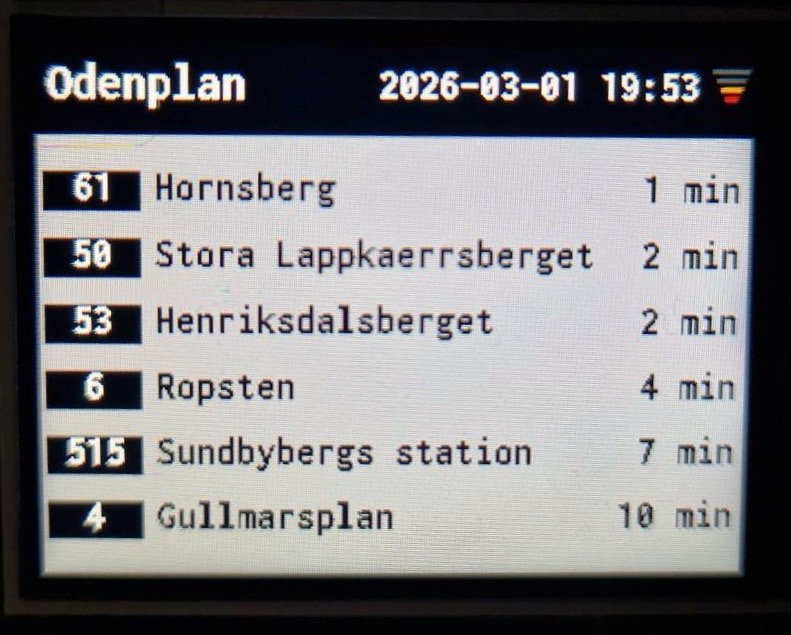
I built a standalone WiFi-connected bus timetable display using an ESP32-C3 and a 240x320 TFT screen. The device fetches live departure data from SL’s public transport API and displays upcoming buses in a clean, flicker-free interface optimized for long-term uptime.
The goal was simple: create a small, always-on information display for the hallway at home — reliable, readable, and fully self-contained. No phone needed.
***
### Hardware
This project is intentionally minimal:
* [**ESP32-C3 Super Mini**](https://www.aliexpress.com/item/1005009014269977.html)
* [**240x320 TFT Display (ST7789, SPI)**](https://www.aliexpress.com/item/1005009014269977.html)
The display’s 7-pin connector can be attached directly onto the ESP32 as a “hat,” keeping the build compact and eliminating the need for jumper wires. To do this correctly, you need to configure the SPI and control pins in software and solder a female pin header onto the ESP32.
The pinout I used for the connection is:
| ESP32 | TFT Display |
| ----- | ----------- |
| GND | G |
| 3.3V | VCC |
| GPIO4 | SCL |
| GPIO3 | SDA |
| GPIO2 | RST |
| GPIO1 | DC |
| GPIO0 | CS |
> **Important note:** The display labels its pins as SDA and SCL, which might suggest I²C usage. However, this display actually communicates via SPI — SDA is **MOSI** (data) and SCL is **SCLK** (clock). The pin mapping in the table and the `User_Setup.h` configuration below reflect the correct SPI assignments:
View User_Setup.h
```cpp
// ===================== Display Setup =====================
#define USER_SETUP_INFO "User_Setup"
#define ST7789_DRIVER
#define TFT_RGB_ORDER TFT_BGR
#define TFT_WIDTH 240
#define TFT_HEIGHT 320
// ===================== Pinout =====================
// Note: Display labels these pins as SDA/SCL, but they are SPI
#define TFT_MOSI 3 // SDA
#define TFT_SCLK 4 // SCL
#define TFT_CS 0 // Chip select
#define TFT_DC 1 // Data/command select
#define TFT_RST 2 // Reset
// ===================== Font & Graphics =====================
#define LOAD_GFXFF
#define SMOOTH_FONT
// ===================== SPI Speed =====================
#define SPI_FREQUENCY 10000000 // SPI clock speed (10 MHz)
```
This setup ensures the display works correctly with the ESP32-C3 and the `TFT_eSPI` library, despite the slightly confusing pin labels on the board.
\
***
### How It Works
The device is designed to run reliably and unattended, mimicking the style of real bus stop timetables. Once powered on, it connects to WiFi, synchronizes time via NTP, and fetches live bus departures from SL's API. The interface displays the line number, destination, departure time, current date/time, and a WiFi signal strength indicator, all centered vertically for readability.
To keep the display visually clean, only rows that have changed since the last fetch are redrawn, preventing flicker. The line-number badge column is dynamically sized to the widest designation in the current response — with a minimum width of four characters — so that rows with short IDs like "4" and long ones like "564V" remain perfectly aligned. If the widest designation changes between refreshes, all rows are repainted automatically to keep the layout consistent.
Between 22:00 and 06:00 the screen is blanked and the ST7789 display controller is put into its low-power sleep state. API polling is suspended during this window, but WiFi and OTA remain active, so firmware updates can still be pushed overnight without waking the display.
If WiFi drops, the device reconnects automatically. During normal operation this shows a brief connection splash before restoring the timetable. During the sleep window, reconnection happens silently in the background without disturbing the blank screen. A periodic refresh every 20 seconds allows the device to recover gracefully from temporary API failures or network hiccups.
Over-the-air firmware updates are supported via ArduinoOTA. The device advertises itself on the local network as `bustimetable` and is selectable directly from the Arduino IDE port menu.
***
### Engineering Notes
The codebase is organized into focused namespaces — `Config`, `State`, `Util`, `UI`, `Net`, `NTP`, `OTA`, `Sleep`, and `API` — each with a single clear responsibility. All display calls are confined to `UI`, all network logic to `Net`, and so on, making the system straightforward to debug and extend.
Several design decisions support long-term stability and correctness:
* `StaticJsonDocument` is used for JSON parsing to avoid heap fragmentation during the frequent 20-second fetch cycles.
* No dynamic memory allocations occur during normal runtime.
* The badge column width is stored in shared state and compared on every render pass. A change in width triggers a full repaint before the diff logic runs, preventing any row from displaying stale geometry.
* The sleep window logic handles midnight-crossing ranges correctly, so a window like 22:00–06:00 works without any special casing at the call site.
* `OTA::handle()` is the first call in `loop()` and is also serviced inside the sleep loop, ensuring OTA is never starved regardless of device state.
* Defensive checks on WiFi connectivity, HTTP status codes, and JSON structure mean a failed fetch is logged and skipped cleanly rather than crashing or leaving stale data on screen.
A critical note for anyone building this project: you **must** use the Arduino IDE board package *"esp32 by Espressif Systems"* version **2.0.14**. Later versions can cause boot loops when combined with `TFT_eSPI` on the ESP32-C3 — an issue documented in [GitHub issue #3284](https://github.com/Bodmer/TFT_eSPI/issues/3284). Using this exact version is essential for stable operation.
***
### Firmware
View Source Code
```cpp
/**
* code base too large
*/
```
***
### Future Improvements
Planned next steps:
* [ ] Design and 3D print a proper enclosure
* [x] Automatic sleep during night hours
* [x] OTA firmware updates
* [ ] HTTPS certificate pinning
* [ ] Hardware backlight control (for other displays)
* [ ] Power using rechargeable batteries + USB-C Li-ion battery charging board
***